12. Job Artifacts
GitHub Job Artifact คืออะไร
Artifact คือไฟล์หรือโฟลเดอร์ที่เกิดขึ้นจากการรัน GitHub Actions workflow ที่เราต้องการเก็บไว้ใช้งานต่อ เช่น ไฟล์ที่ build เสร็จแล้ว, dist folder จากการ build react csr, testing report, หรือ log files
ตัวอย่างการใช้งาน
เราจะใช้ action actions/upload-artifact@v4 ช่วยทำงานส่วนนี้
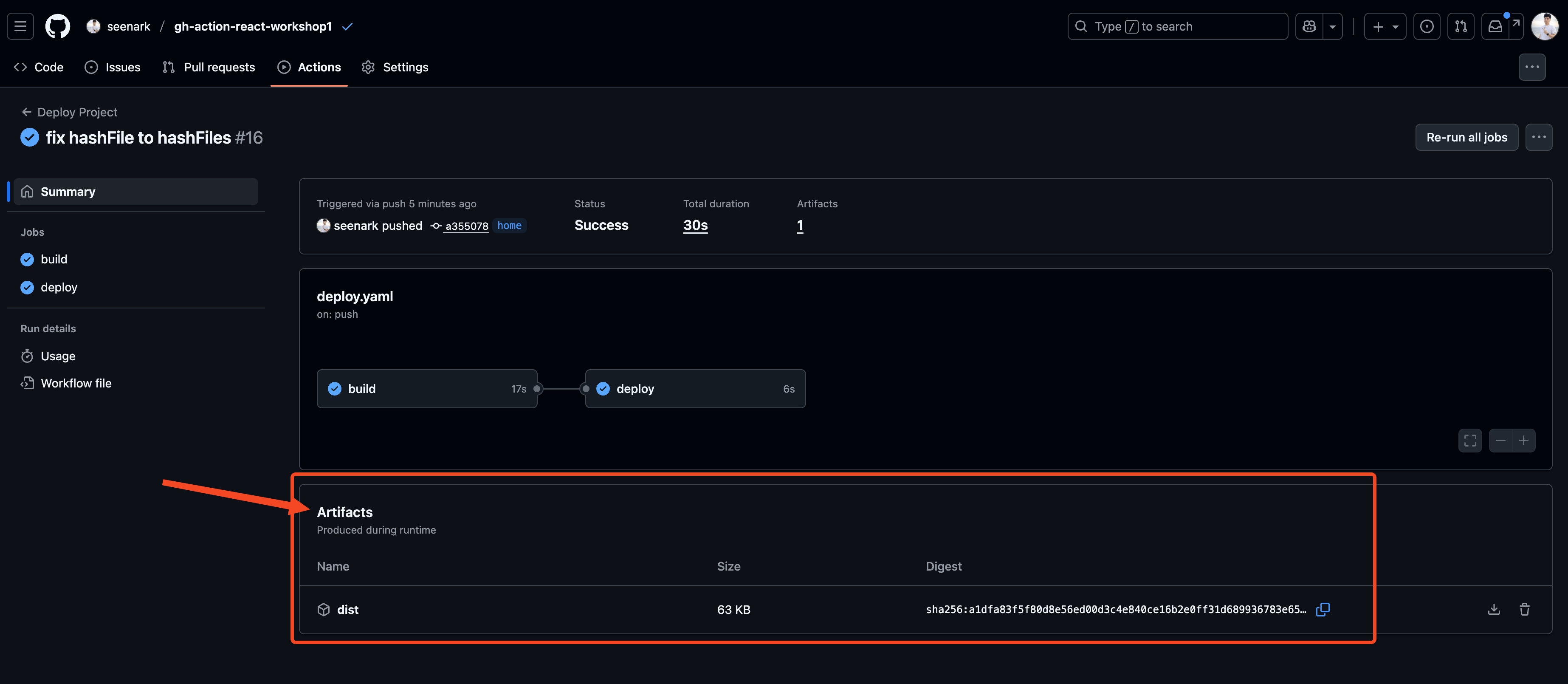
ยกตัวอย่างเช่น เรา build React csr จาก Vite จะได้ folder dist มาใช่มะ เราก็จะต้องเอา folder dist upload ไปเก็บไว้ที่ Artifacts Storage ก่อน
ถ้า Jobs อื่นอยากใช้งานก็ให้ใช้ action actions/download-artifact@v4 เพื่อ download มาใช้งาน
Artifacts Storage เป็นเหมือนพื้นที่ตรงกลางที่เก็บไฟล์ให้เราอะนะ
flowchart TD
    subgraph "React Vite Pipeline"
        direction TB

        subgraph "Job 1: Test"
            A[🧪 Run Tests] --> B[📊 Generate Coverage]
            B --> C[📤 Upload test-results.zip]
        end

        subgraph "Job 2: Build"
            D[🏗️ npm run build] --> E[📦 Create dist/ folder]
            E --> F[📤 Upload vite-build.zip]
        end

        subgraph "Artifacts Storage"
            G[(📁 GitHub Storage)]
            H[test-results.zip]
            I[vite-build.zip]
        end

        subgraph "Job 3: Deploy"
            J[📥 Download vite-build.zip] --> K[🚀 Deploy to Vercel]
            K --> L[✅ Deployment Success]
        end
    end

    %% Connections
    C --> G
    F --> G
    G --> H
    G --> I
    I --> J

    %% Catppuccin Mocha Colors
    classDef testJob fill:#f38ba8,stroke:#eba0ac,stroke-width:2px,color:#11111b
    classDef buildJob fill:#89b4fa,stroke:#74c7ec,stroke-width:2px,color:#11111b
    classDef deployJob fill:#a6e3a1,stroke:#94e2d5,stroke-width:2px,color:#11111b
    classDef storage fill:#cba6f7,stroke:#b4befe,stroke-width:2px,color:#11111b
    classDef artifacts fill:#f9e2af,stroke:#fab387,stroke-width:2px,color:#11111b

    %% Apply Classes
    class A,B,C testJob
    class D,E,F buildJob
    class J,K,L deployJob
    class G storage
    class H,I artifacts
ที่ต้องทำแบบนี้ก็เพราะว่าแต่ละ Jobs มันทำงานอยู่กันคนละที่เลย
- เก็บไฟล์ Build
- name: Build app run: npm run build
- name: Upload build files uses: actions/upload-artifact@v3 with: name: build-files path: dist/- เก็บ Test report
- name: Run tests run: npm test
- name: Upload test report uses: actions/upload-artifact@v3 with: name: test-report path: coverage/- ใช้ Artifact ใน Job อื่น
job2:needs: job1steps: - name: Download build files uses: actions/download-artifact@v3 with: - name: build-files path: ./buildArtifact จะถูกเก็บไว้ 90 วัน (default) และสามารถดาวน์โหลดได้จากหน้า Actions ของ repository
Hands-on
มาลงมือทำกัน
ยังอยู่ที่โปรเจคเดิม
เราสั่ง build จะได้แบบนี้
bun run build$ tsc -b && vite buildvite v7.1.5 building for production...✓ 32 modules transformed.dist/index.html 0.46 kB │ gzip: 0.30 kBdist/assets/react-CHdo91hT.svg 4.13 kB │ gzip: 2.05 kBdist/assets/index-D8b4DHJx.css 1.39 kB │ gzip: 0.71 kBdist/assets/index-hT4HLifg.js 188.03 kB │ gzip: 59.20 kB✓ built in 458msเราจะได้ folder dist มา
Flow ที่เราจะทำคือ มี 2 jobs
- Build job
- Deploy job
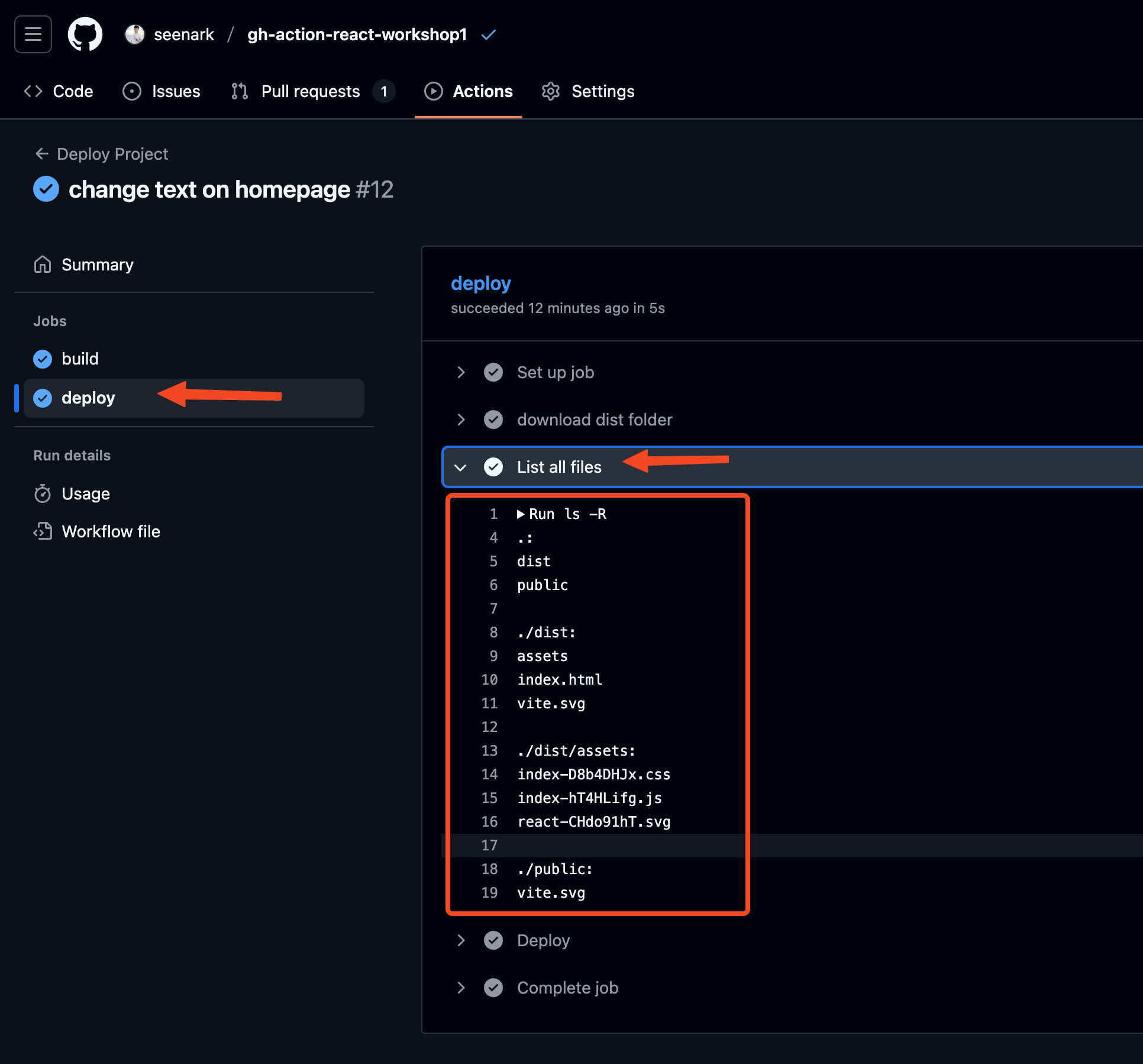
Build job เราจะเอา folder dist upload ไปเก็บที่ Artifact storage
แล้วให้ Deploy job ดาวน์โหลดมาใช้ เพื่อ deploy ต่อไป
workflows/deploy.yaml
name: Deploy Projecton: push: workflow_dispatch: pull_request:jobs: build: runs-on: ubuntu-latest steps: - name: Get Code uses: actions/checkout@v4 - name: Install Bun uses: oven-sh/setup-bun@v2 with: bun-version: 1.2.18 - name: Install Dependencies run: bun i - name: Build run: bun run build - name: upload dist folder uses: actions/upload-artifact@v4 with: name: dist-folder path: | dist public
deploy: needs: - build runs-on: ubuntu-latest steps: - name: download dist folder uses: actions/download-artifact@v4 with: name: dist-folder - name: List all files run: ls -R - name: Deploy run: echo "Deploying..."ลองเปิดดูที่หน้าเว็ป